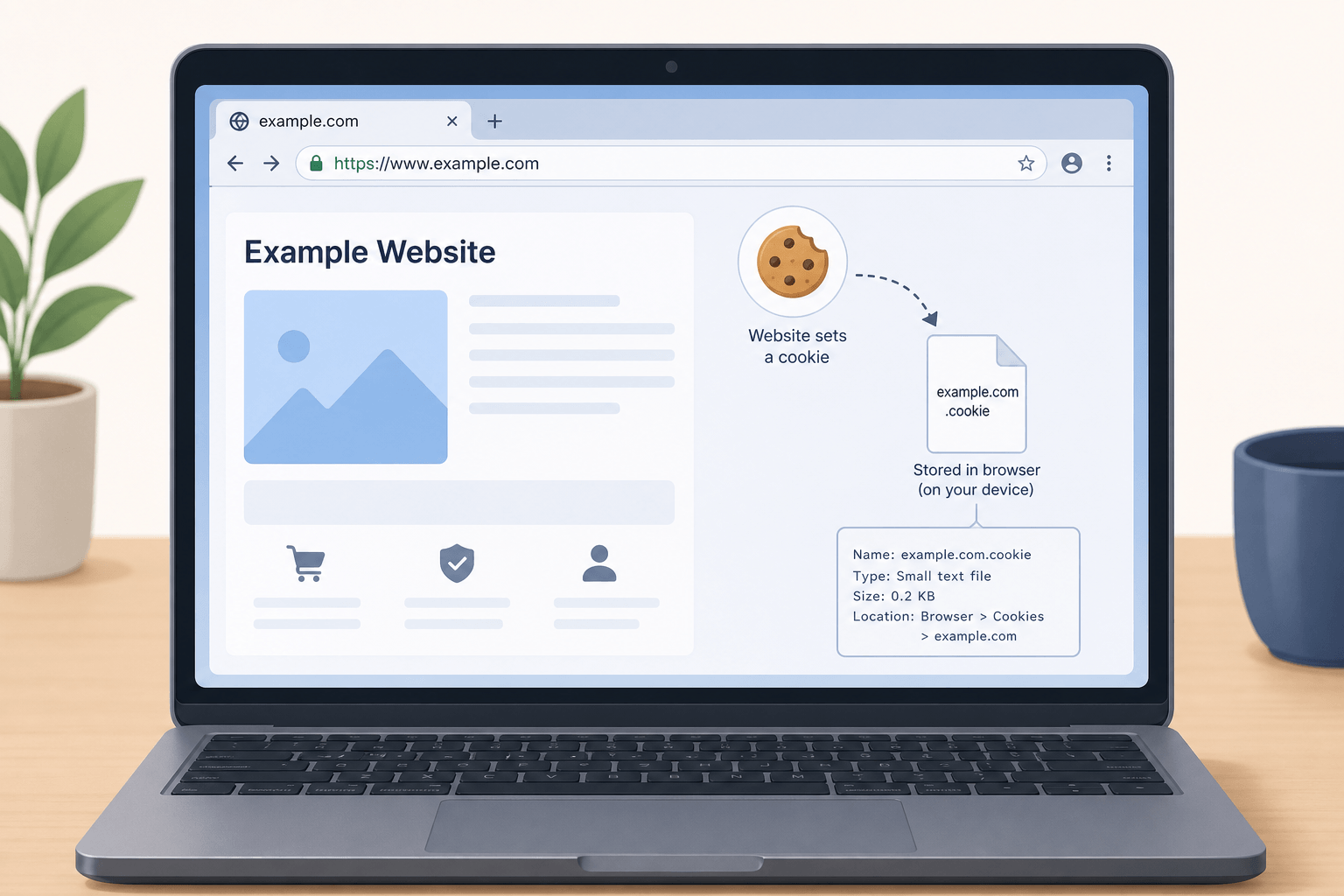
A cookie is a tiny text file that a website saves on your computer or phone when you visit. It is not a program. It cannot run code. It cannot spread viruses. Think of it like a small sticky note your browser sticks onto your device — holding small bits of information like your login status or preferences.
Without cookies, every page load would forget who you are. You would re-enter your password on every page, your shopping cart would vanish at checkout, and your language preferences would reset on every visit.
1
What Is a Cookie on a Website?
Have you ever noticed that a shopping website remembers what you put in your cart even after you close the browser? Or that a news site shows you local weather without asking for your location again? That little memory trick comes from something called a website cookie.
A cookie is a tiny text file that a website saves on your computer or phone when you visit. This browser-stored data exists solely within your browser's storage system. The purpose is to help websites remember user-specific information about you between page loads.
The functionality is straightforward: store, retrieve, and update small pieces of text. The data type stored is always plain text, never executable code. This creates a browser dependency — the cookie only works within the browser that saved it, and only the website that created it can access it.
What It Is
A small plain text file saved by your browser in a dedicated folder or database controlled by the browser.
What It Is NOT
Not a program. Not executable code. Not a virus. Cookies cannot run, damage files, or access your personal documents.
What It Stores
Login status, language preferences, cart contents, session IDs, and browsing preferences — all as plain text.
2
How Website Cookies Work
Let us walk through what happens behind the scenes when a cookie is created and used.
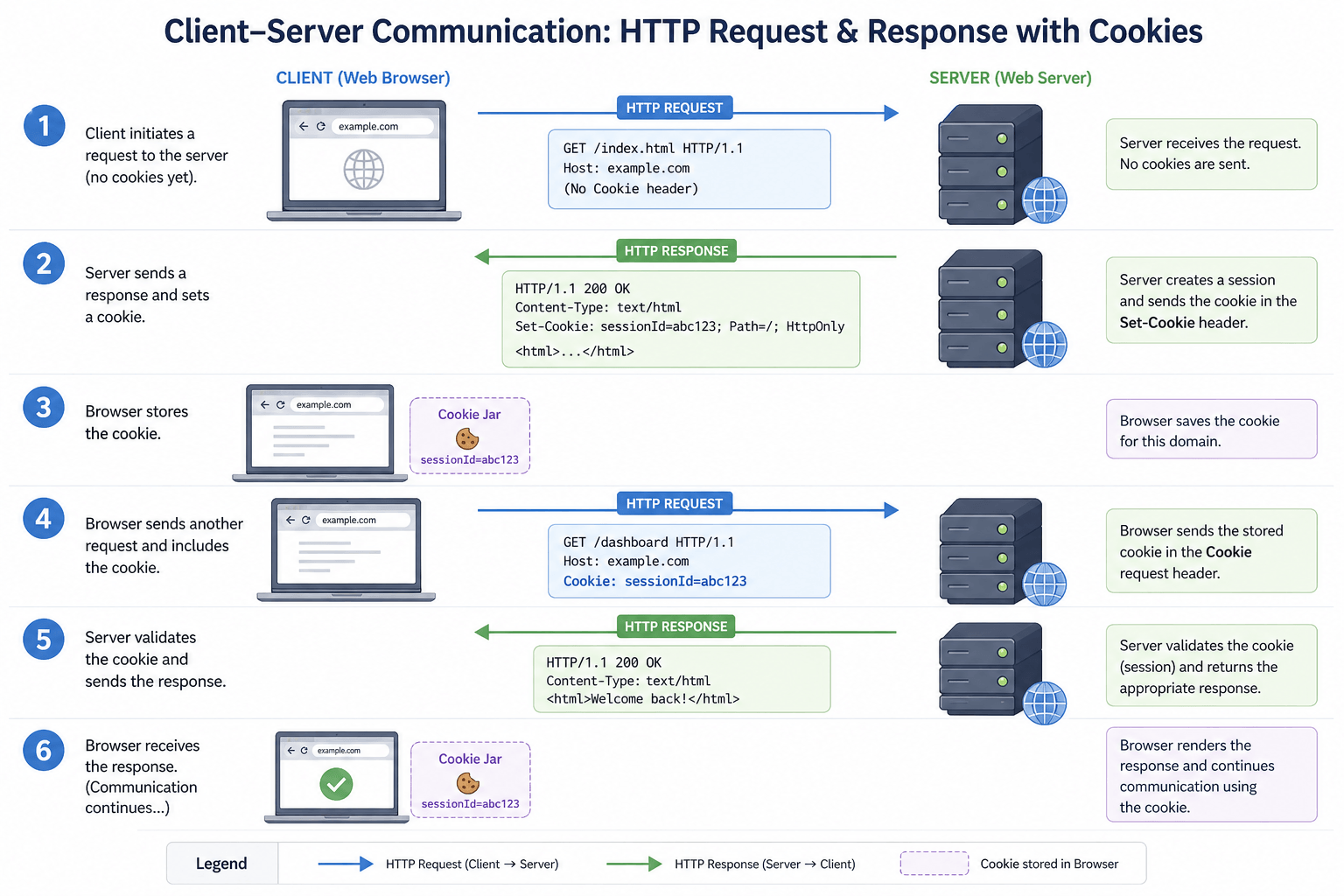
The creation process begins when a website wants to remember something about you. When you visit a website, your browser sends a request to that website's web server. The server responds with the page you asked for — and along with that response, it can send a small text file through HTTP headers. That text file is an HTTP cookie. Your browser then stores it on your device in a specific folder or database that it controls.
The next time you visit the same website, your browser looks for any stored cookies that belong to that site. If it finds one, it sends the cookie back to the server along with your request. This is how the server recognises you — known as a user recognition mechanism. All of this happens invisibly in the background.
The 7-Step Cookie Cycle
- You type a website address like amazon.com — cookies are tied to specific domains and only work for the website that created them.
- Your browser asks the server for the page using an HTTP request header.
- The server sends the page plus a cookie inside the HTTP response header.
- Your browser saves the cookie locally along with an expiration date that tells the browser when to delete it.
- You visit another page on the same site.
- Your browser automatically sends the saved cookie back in the request header.
- The server recognises you instantly using a unique session ID.
Cookie Attributes That Control Behaviour
| Attribute | What It Does | Security Benefit |
|---|---|---|
| Secure | Cookie only sent over HTTPS encrypted connections | Prevents interception on unsecured networks |
| HttpOnly | JavaScript cannot read the cookie | Protects against XSS attacks that steal cookies |
| SameSite=Lax | Sent only when you click a direct link | Prevents most CSRF attacks |
| SameSite=Strict | Never sent for cross-site requests | Maximum CSRF protection |
| Domain | Specifies which domain can receive the cookie | Limits cookie scope to intended site |
| Expires/Max-Age | Sets when the cookie is automatically deleted | Reduces long-term tracking risk |
3
Types of Website Cookies
Not all cookies are the same. They have different jobs, different lifespans, and different levels of privacy impact.
Session Cookies
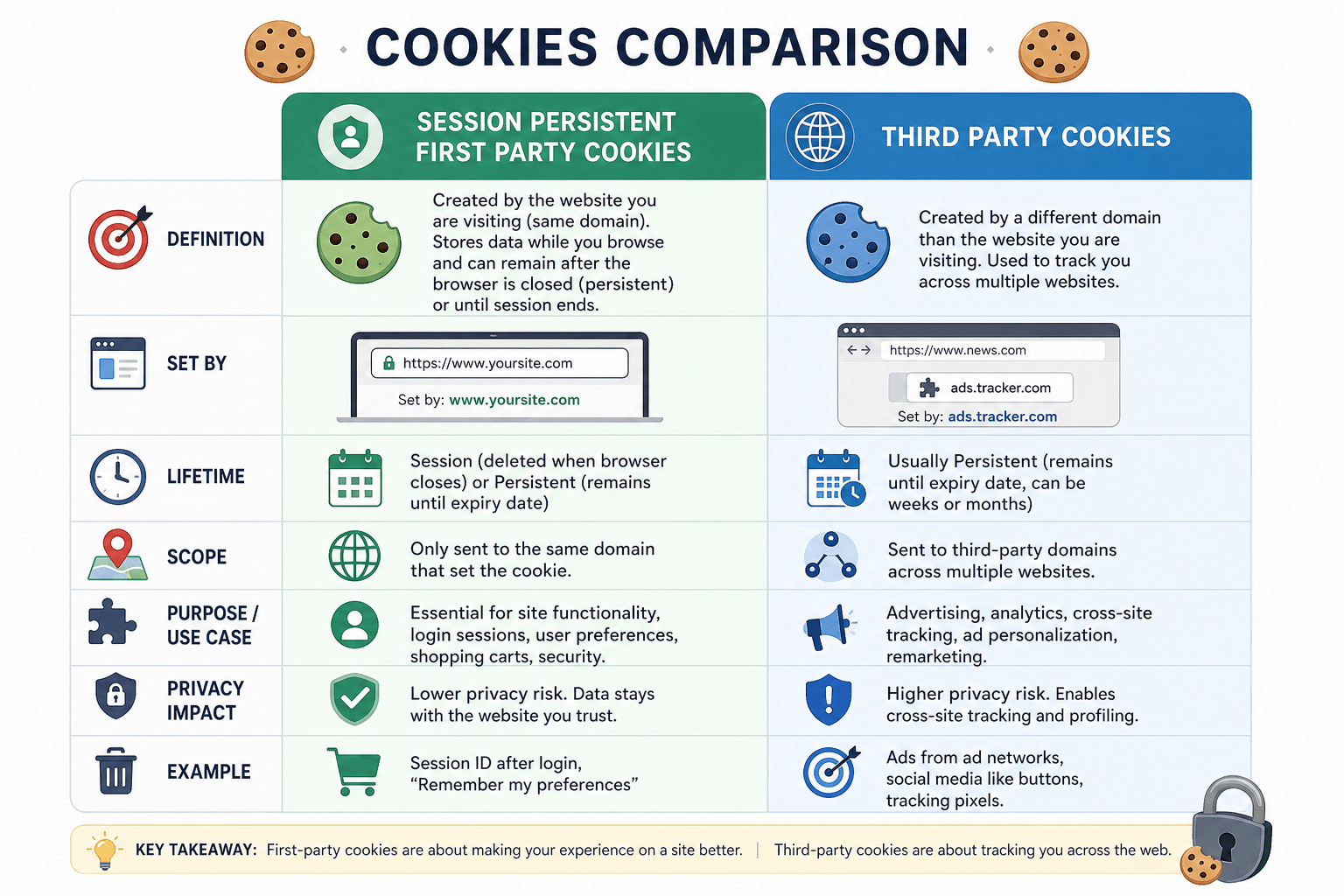
Temporary cookies that live only while your browser is open. Close the browser and they disappear. Online banking uses session cookies so your login ends when you close the window.
Persistent Cookies
Remain on your device until they expire or you delete them. A "Remember Me" checkbox on a login form creates a persistent cookie that can last 30 days or more.
First-Party Cookies
Come directly from the website you are visiting. Generally considered safer and more useful — they remember your language preference or shopping cart.
Third-Party Cookies
Come from a different domain — often an advertiser or analytics company. These cookies can track you across multiple websites, enabling targeted advertising.
Secure Cookies
Can only be sent over an encrypted HTTPS connection. This prevents attackers from reading them while they travel across the network.
HttpOnly Cookies
Cannot be read by JavaScript code running on the page. This protects against XSS attacks where malicious scripts try to steal cookies. A security flag that good websites always enable.
SameSite Cookies
Control whether a cookie is sent when you navigate from another website. Helps prevent cross-site request forgery (CSRF) attacks.
Tracking / Behavioural Cookies
Used to build a profile of your browsing behaviour. Almost always third-party cookies used by ad networks to show relevant ads based on your interests.
Authentication Cookies
Store encrypted login credentials or session tokens. When you log in, an authentication cookie tells the server you have already proven who you are — so you don't re-enter your password on every page.
4
Purpose of Cookies on Websites
Cookies do a lot of helpful work behind the scenes. Here are the main reasons websites use them:
Maintaining Login Sessions
The most common use. Without a login cookie, you would enter your username and password for every single page. The cookie holds an encrypted token that confirms your identity seamlessly.
Saving Shopping Cart Items
When you add a shirt to your cart, the website stores that information in a cookie. Move to another page, and the cookie tells the site what is still in your cart.
Remembering Language & Preferences
A cookie remembers that you prefer Spanish, or prices in Canadian dollars. No need to select it again on your next visit. Dark mode, font size, layout — all remembered.
Personalised Recommendations
Streaming services suggest movies based on your watch history. News sites show topics you read most. These personalised recommendations improve over time as cookies learn your taste.
Analytics & Visitor Tracking
Tools like Google Analytics rely on cookies to count unique visitors, track page views, and measure how long people stay — helping website owners improve their content.
Targeted Advertising
An ad network drops a cookie when you visit a shoe store. Later, when you read a news article, that same network shows you shoe ads. Effective but controversial.
5
Real-Life Cookie Examples
Saved Cart & Personalised Recommendations
Amazon uses persistent cookies to track every product view, search query, and purchase. When you return to the site, their recommendation engine analyses that cookie data to show "Customers who bought this also bought" suggestions. This personalisation drives an estimated 35% of Amazon's revenue. Saved cart products remain in your cart even if you close the browser and return days later.
Cross-Site Advertising Tracking
Facebook places a third-party cookie on millions of websites through its Like button and Facebook Login feature. When you visit a shoe store that has a Facebook pixel installed, that cookie tells Facebook what you looked at. Later, you see shoe ads in your Facebook feed. This advertising retargeting system processes billions of events daily and has shaped privacy regulations worldwide.
Watch History & Continue Watching
Netflix uses watch history cookies to remember where you paused a movie. Their recommendation engines rely heavily on cookie data to suggest what to watch next — appearing in the "Continue Watching" row. These first-party personalisation cookies demonstrate how cookies can be used ethically with no third-party tracking involved.
Session Verification & Trusted Devices
Online banking portals use session cookies that expire the moment you close the browser. If you check "remember this device," they set a persistent cookie for faster future logins. These are authentication cookies with the highest security flags — Secure, HttpOnly, and SameSite=Strict — ensuring your session cannot be intercepted or replicated.
6
Advantages of Website Cookies
Faster Website Access
Cookies eliminate repetitive tasks. You do not re-enter your address on every shopping site. You do not re-select your country on every news page.
Convenient Auto-Login
With a secure persistent cookie, you log in once and stay logged in for days or weeks — saving you from typing passwords dozens of times daily.
Seamless Browsing Experience
Close your browser, open it again, and pick up right where you left off. Shopping carts, reading positions, and preferences are all preserved.
Personalised Content Delivery
A recipe site suggests vegetarian dishes because it remembers your preference. A sports app shows your favourite team first. The web adapts to you.
Improved Website Efficiency
Storing information locally instead of making the server remember everything reduces server load and speeds up page loads for everyone.
Better Session Stability
As you click from page to page, your login status and cart contents remain consistent. Enhanced navigation usability makes browsing feel smooth and reliable.
7
Risks and Privacy Concerns
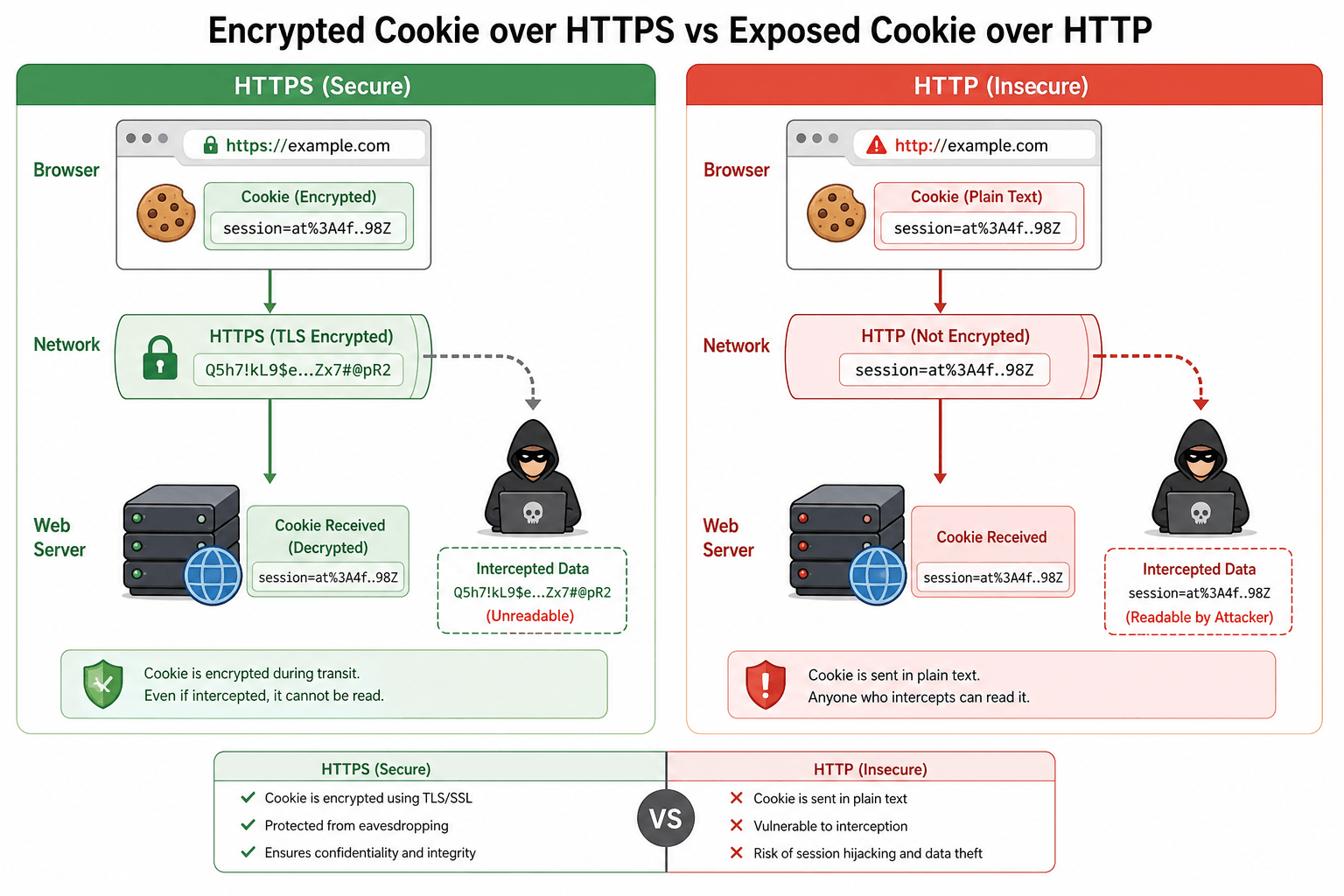
Cookies also have a darker side, especially third-party tracking cookies. Here is where we need to be honest about the risks:
8
Are Cookies Safe?
The safety of cookies depends entirely on the website and how you manage your browser. Here is a clear breakdown:
Safer Cookie Signals
✓ Website uses HTTPS
✓ Secure flag set
✓ HttpOnly flag set
✓ SameSite attribute present
✓ First-party origin
✓ Clear expiration date
Warning Signs
✗ No HTTPS (plain HTTP)
✗ Third-party unknown domain
✗ No expiration set
✗ Missing HttpOnly flag
✗ Suspicious website origin
✗ No privacy policy visible
9
How to Manage or Delete Cookies
You have full control over cookies. Your browser gives you tools to see, delete, and block them.
10
Cookie Consent and Privacy Laws
You have seen those cookie banners on almost every website. They exist because of privacy laws passed in recent years. Here is what you need to know:
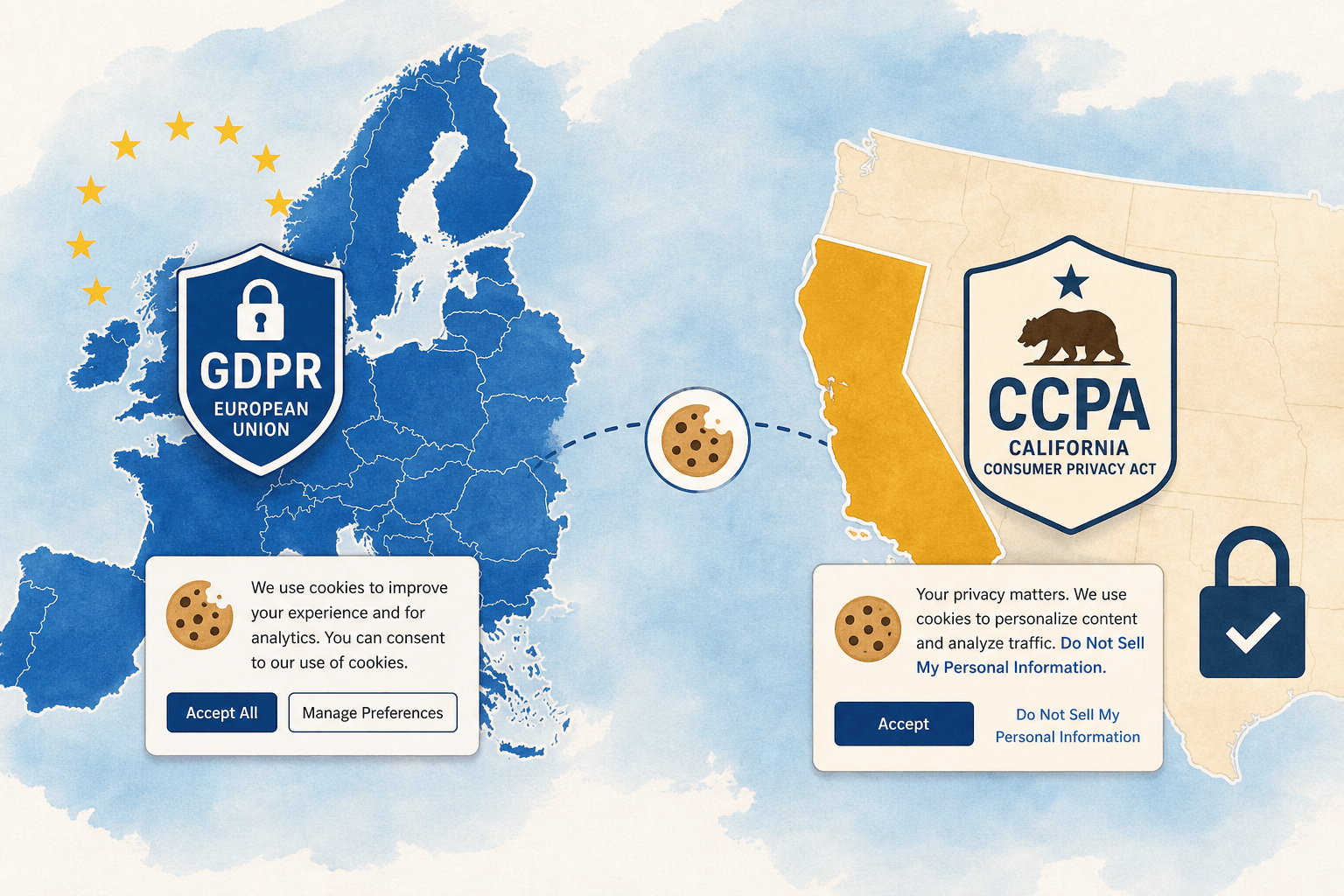
| Law | Region | Key Requirement | Penalty |
|---|---|---|---|
| GDPR | European Union | Explicit consent before tracking cookies; right to access and delete data; 72-hour breach notification | Up to €20M or 4% of global revenue |
| CCPA | California, USA | Right to opt out of the sale of personal data; websites must disclose data collection practices | Up to $7,500 per intentional violation |
| ePrivacy Directive | EU (Cookie Law) | Consent required before storing non-essential cookies; pre-checked boxes are illegal | National regulatory penalties |
| PDPA | Thailand, Turkey, others | Similar to GDPR — informed consent required for data collection including cookies | Varies by country |
Essential Cookies
Login sessions, security tokens, shopping cart. No consent needed — required for basic functionality.
Analytics Cookies
Google Analytics, visitor counts. Consent required — helps improve the website but not strictly essential.
Marketing Cookies
Ad retargeting, cross-site tracking. Consent required — most privacy-sensitive type; safe to reject on any site.
11
Cookies vs Similar Technologies
| Technology | Storage Limit | Sent to Server? | Expiry | Privacy Risk |
|---|---|---|---|---|
| Cookies | 4 KB | Yes — automatically with every request | Session or set date | Medium (third-party high) |
| Local Storage | Up to 10 MB | No — stays on device | Until manually cleared | Low (same-origin only) |
| Session Storage | Up to 5 MB | No — stays on device | Cleared on tab close | Low |
| Cache | Hundreds of MB | No — stores page resources | Until cleared or expired | Very low |
| Tracking Pixels | N/A (1×1 image) | Yes — on image load | No expiry | High (invisible tracking) |
| Fingerprinting | N/A (server-side) | Yes — device signals sent | No expiry | Very high (cannot be deleted) |
12
Impact of Disabling Cookies
Benefits of Blocking Cookies
🔸 Stops cross-site behavioural tracking
🔸 No ad networks building your profile
🔸 No retargeting ads following you
🔸 Increased browsing privacy
🔸 Less data shared with third parties
Downsides of Blocking Cookies
🔸 Constant login prompts on every page
🔸 Shopping cart empties between pages
🔸 No saved preferences or dark mode
🔸 No "Continue Watching" lists
🔸 Some website features may break
13
Best Practices for Users
14
Best Practices for Website Owners
If you run a website, cookies come with legal and ethical responsibilities. Here is what you must do:
| Cookie Type | Purpose | Duration | Third Party | Consent Needed? |
|---|---|---|---|---|
| Session ID | Login state | Session | No | No — essential |
| Language | User preference | 1 year | No | No — functional |
| Analytics | Visitor count | 2 years | Yes | |
| Ad Tracker | Retargeting | 90 days | Ad network | Yes |
Use Secure Cookie Attributes
Always set the Secure flag (HTTPS only), HttpOnly flag (no JavaScript access), and SameSite=Lax or Strict to prevent CSRF attacks.
Provide Transparent Cookie Notices
List every cookie your site uses, what it does, how long it lasts, and whether it shares data with third parties. Write in plain language, not legal jargon.
Obtain Clear User Consent
No cookies before permission (except strictly necessary ones). No pre-checked boxes. Allow users to reject non-essential cookies without losing access to the site.
Minimise Unnecessary Tracking
Collect only what you actually need. Audit your tags and pixels every quarter. Remove anything that does not directly improve your business or user experience.
Implement HTTPS Site-Wide
HTTPS across your entire site is mandatory for secure cookies. A cookie sent over HTTP can be read by anyone on the same network — this is non-negotiable.
Conduct Regular Privacy Audits
Review compliance with GDPR and CCPA every quarter. Check that all third-party scripts are necessary, declared in your cookie notice, and properly consented to.
15
The Future of Website Cookies
The web is changing fast. Third-party cookies are disappearing — Safari and Firefox already block them by default, and Google Chrome has been phasing them out.
Decline of Third-Party Cookies
Safari and Firefox block them by default. The digital advertising ecosystem is scrambling to adapt with new privacy-preserving alternatives.
Google Privacy Sandbox
A set of proposals to replace third-party cookies — including the Topics API (broad interests without specific history) and Attribution Reporting API for ad measurement.
Server-Side Data Collection
Moving tracking to the website's own server instead of your browser gives more control and bypasses browser blocking — but still requires user consent.
Contextual Advertising
Targeting ads based on the content you are currently reading — not your personal history. Effective without invasive cross-site tracking and gaining popularity.
AI-Powered Personalisation
AI may change how recommendations work without cookies — using on-device processing and aggregated signals instead of individual tracking cookies.
Stronger Privacy Regulations
More countries are passing GDPR-style laws. Greater transparency requirements and enhanced user data control are coming — the regulatory trend is one-way only.
16
Common Myths About Cookies
FALSE. Computer viruses are executable programs. Cookies are plain text files. They cannot run, replicate, or damage files. Cookies do not directly damage devices, no matter how many you accumulate. The harm from cookies is to privacy — not to your computer.
FALSE. A cookie is a few kilobytes at most — less than a single emoji image. Even hundreds of cookies take up negligible space. They do not consume processing power or affect device performance in any measurable way.
FALSE. Most cookies are harmless and helpful. Login and preference cookies improve your experience every day. Only third-party tracking cookies raise privacy concerns. Blocking all cookies would break most of the websites you use.
FALSE. Cookies cannot read personal files on your computer. They cannot read or write anything on your device outside of the small cookie storage controlled by your browser — which is isolated from your documents, photos, and other files.
FALSE. Deleting cookies helps, but websites can still identify you through browser fingerprinting, IP address, and login data. For true anonymity you would also need a VPN, a privacy browser, and careful attention to what you log into.
17
Frequently Asked Questions
Reputable websites never store plain-text passwords in cookies. They store an encrypted session token that the server verifies — not your actual password. If you see a "Remember Me" checkbox, it creates a persistent cookie with an encrypted authentication token, not your password itself. Modern encryption makes properly configured authentication cookies secure. Use a password manager instead of relying on cookie-stored credentials for your most sensitive accounts.
Cookies themselves cannot steal data — they are passive text files. However, an attacker who gains access to your cookies could impersonate you on websites where those cookies are valid — a technique called session hijacking. This is why cookies are targets, not weapons. Protect yourself by using HTTPS sites, avoiding public Wi-Fi for sensitive accounts, and keeping your browser updated.
The smart approach: Accept essential and functional cookies. Reject marketing and analytics cookies. Most cookie banners offer granular controls if you click "Customise" instead of "Accept All." Rejecting all non-essential cookies stops most third-party tracking but may break some website features. For maximum privacy, use a browser that blocks third-party cookies by default (Firefox, Brave, Safari) so you rarely need to think about banners.
No. Cookies cannot damage hardware, delete files, or install software. They are simply text stored in a browser-controlled folder. The harm from cookies is to privacy — not to your device. Even hundreds of cookies take up negligible storage space and have no impact on device performance.
Because laws like GDPR (European Union) and CCPA (California) require it. Without your consent, websites cannot legally store tracking and advertising cookies on your device. Essential cookies — for login and security — are exempt and do not need consent. Non-compliance can result in fines of up to €20 million under GDPR. After 2018, cookie consent banners became mandatory for websites serving EU visitors.
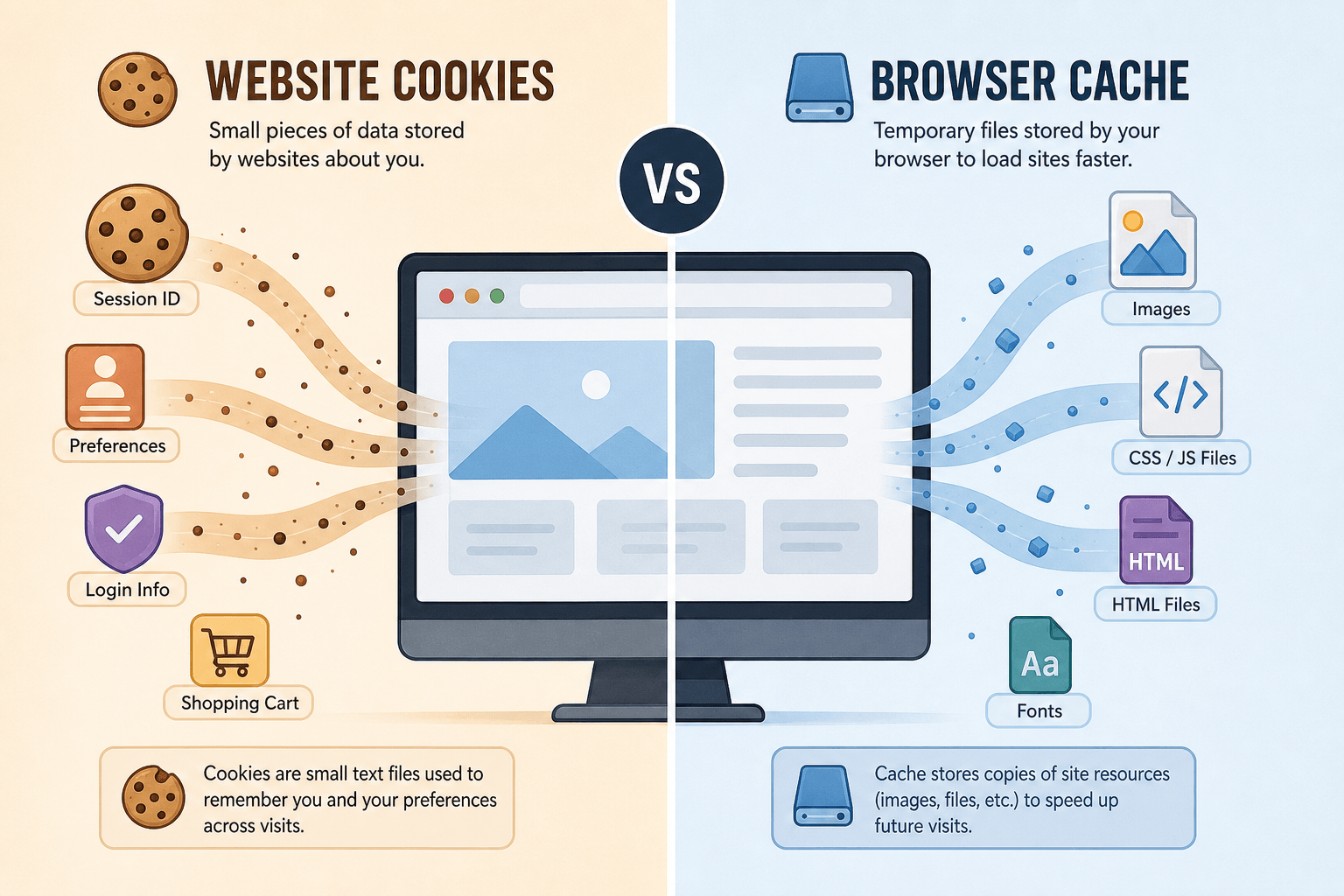
The cache stores parts of web pages — images, stylesheets, JavaScript files — to load pages faster on repeat visits. Cookies store user-specific state and preferences like your login status, language, and shopping cart. The cache is for content performance. Cookies are for memory and personalisation. You can clear both independently in your browser settings — they serve completely different purposes.
18
Cookie Glossary
| Term | Definition |
|---|---|
| Cookie | A small plain text file stored on your device by a website through your browser to remember information between page loads. |
| Session Cookie | A temporary cookie that exists only while your browser is open — deleted automatically when you close the browser. |
| Persistent Cookie | A cookie with a set expiration date that remains on your device after the browser is closed — until the expiry date or until you delete it. |
| First-Party Cookie | A cookie set by the website you are currently visiting — generally safe and used for login, preferences, and cart data. |
| Third-Party Cookie | A cookie set by a domain other than the one you are visiting — typically used by advertisers and analytics companies for cross-site tracking. |
| HttpOnly | A cookie attribute that prevents JavaScript from reading the cookie — protects against XSS attacks. |
| Secure Flag | A cookie attribute that ensures the cookie is only sent over HTTPS encrypted connections — prevents interception. |
| SameSite | A cookie attribute that controls whether the cookie is sent in cross-site requests — helps prevent CSRF attacks. |
| Session Hijacking | An attack where a malicious actor steals your session cookie to impersonate you on a website without needing your password. |
| GDPR | General Data Protection Regulation — EU law requiring explicit consent before placing non-essential cookies on users' devices. |
| Fingerprinting | A tracking technique that identifies your browser/device using dozens of signals — works even when cookies are deleted. |
| Consent Banner | The pop-up notification websites show to inform you about cookies and ask for your permission before placing tracking cookies. |
19
Get a Professional Cookie Audit from Webperts

Now that you understand how cookies work and how they affect your privacy and browsing experience, you might be wondering about your own website. Are your cookies set up correctly? Is your cookie consent banner compliant with GDPR and CCPA? Do you have security flags like HttpOnly and Secure properly configured?
Cookie Implementation Audit
Full scan of every cookie your site sets — checking security flags, expiration, third-party origins, and whether each cookie is declared in your consent notice.
GDPR & CCPA Compliance Review
We review your consent banner, cookie policy, and data processing practices to ensure you meet EU and California privacy law requirements.
Security Flag Verification
Every cookie checked for Secure, HttpOnly, and SameSite attributes — plus full HTTPS implementation review across your entire site.
Is Your Website Cookie-Compliant?
The Webperts team — the top website development company in Dubai — specialises in comprehensive website audits covering cookie implementation, privacy compliance, performance optimisation, and security hardening. We test every cookie, review every consent banner, and check every security flag so you can feel confident your website respects visitor privacy while functioning beautifully.
Get Your Free Cookie Audit →Explore Our Web Services
20
Conclusion
Cookies are one of the most misunderstood technologies on the web. They are not viruses. They are not dangerous to your device. They are small text files that make the web work — keeping you logged in, saving your cart, and remembering your preferences.
The real question is not whether cookies are good or bad — it is which cookies, from whom, and with your knowledge. First-party cookies from websites you trust pose little risk and provide genuine convenience. Third-party tracking cookies from unknown advertisers deserve your scepticism and, increasingly, your browser's automatic blocking.
As a user: block third-party cookies by default, clear cookies monthly, and take 10 seconds on consent banners to reject marketing cookies. As a website owner: use Secure and HttpOnly flags on every cookie, get proper consent before tracking, minimise what you collect, and audit your cookie implementation regularly.
The web is moving towards a cookieless future — but until then, a little knowledge goes a long way towards safer, more private browsing.