Cybersecurity is the practice of protecting computers, servers, mobile devices, networks, and data from malicious attacks. Think of it as a digital immune system — constantly working to detect, prevent, and respond to threats.
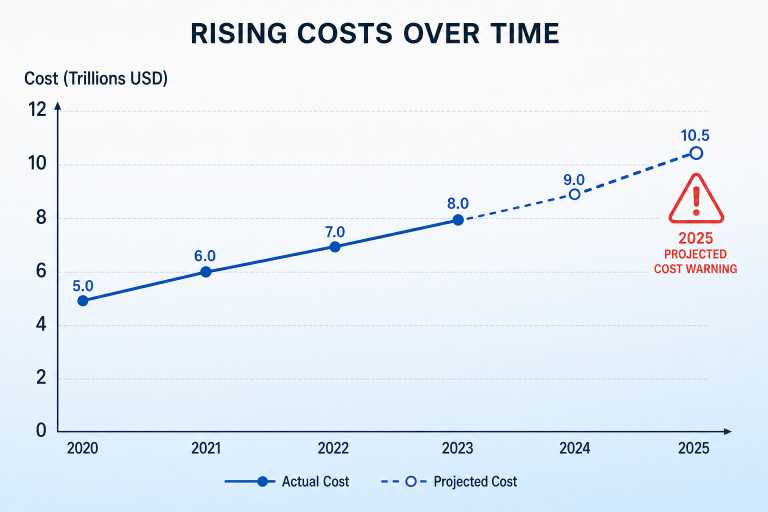
In 2023, cybercrime losses reached $8 trillion globally. By 2025, this is projected to climb to $10.5 trillion — growing at 15% per year. If cybercrime were a country, it would be the third-largest economy in the world.
1
Introduction to Cybersecurity
In today's connected world, cybersecurity isn't just for tech companies or governments — it's essential for everyone. Whether you're checking your bank account on your phone, running a small business, or managing a hospital's patient records, you're a potential target.
For Individuals: Identity theft, financial fraud, loss of privacy, and exposure of personal information can devastate personal lives.
For Businesses: A single data breach can cost millions in recovery, legal fines, and lost customers. Beyond the financial hit, businesses face loss of intellectual property and operational disruption that can take months to recover from.
For Governments: Cyberattacks can disrupt critical infrastructure — power grids, water systems, financial markets — threatening national security and public safety.
2
How Cybersecurity Works
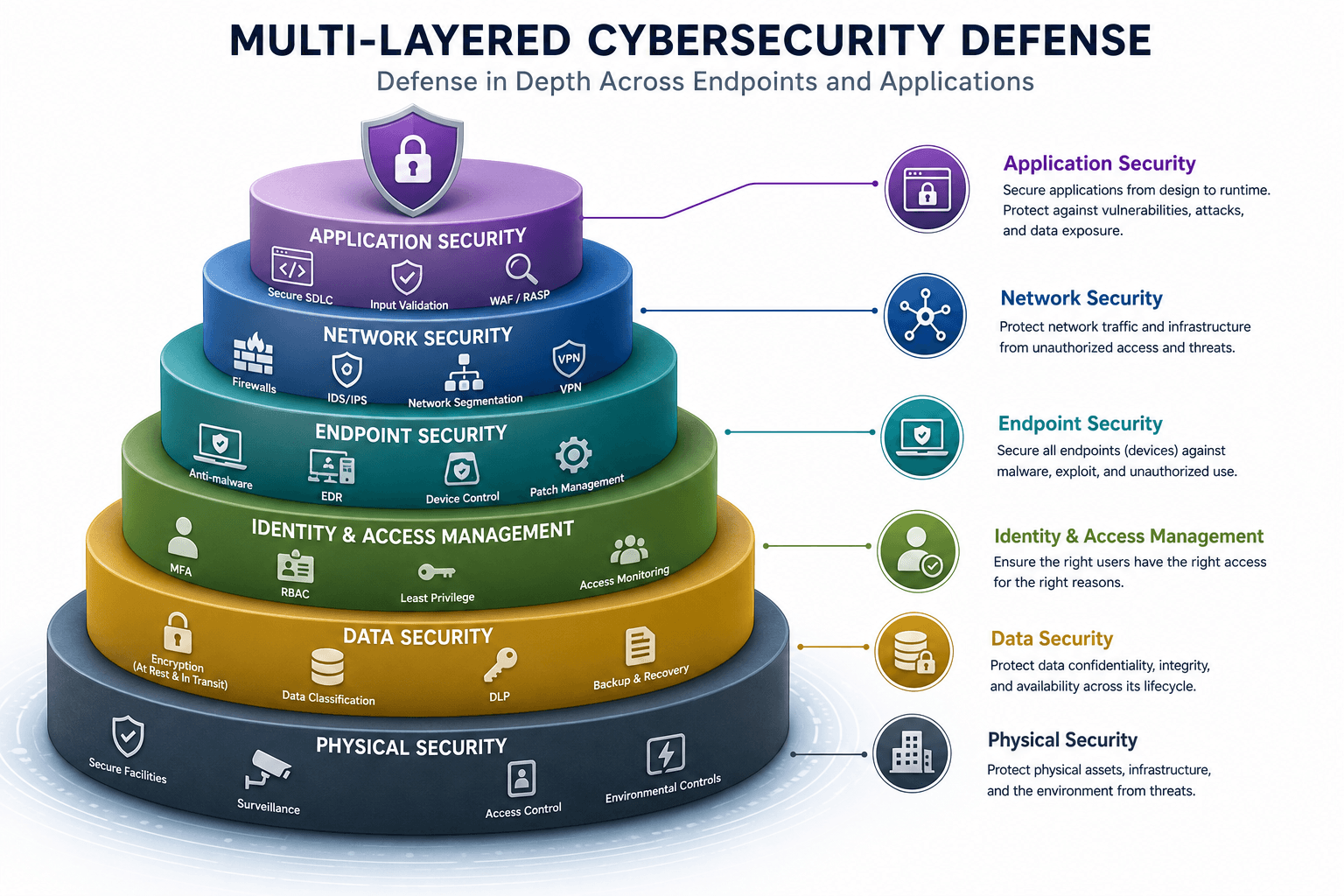
Cybersecurity operates through a layered approach — often called "defence in depth." No single tool can protect you completely, so multiple overlapping layers work together. The process follows three main phases:
Prevention
Stop attacks before they happen through firewalls, antivirus, strong passwords, and security training.
Detection
Identify threats in progress using monitoring tools, intrusion detection systems, and anomaly alerts.
Response
React quickly to minimise damage — isolate systems, remove malware, restore from backups, and notify affected parties.
The Seven Layers of Cybersecurity
| Layer | What It Does | Examples |
|---|---|---|
| Physical Security | Protects physical hardware and facilities | Locked server rooms, controlled access |
| Network Security | Secures data in transit across networks | Firewalls, VPNs, network monitoring |
| Endpoint Security | Protects individual devices | Antivirus, real-time threat detection |
| Application Security | Keeps software and apps secure | Secure coding, app testing, WAFs |
| Data Security | Protects data at rest and in transit | Encryption, access controls, secure backups |
| User Awareness | Educates people to recognise threats | Phishing simulations, security training |
| Authentication Systems | Verifies user identities | Multi-factor authentication, biometrics |
Strong cybersecurity also depends heavily on policies — written rules about how employees handle data, how passwords are managed, and what to do in an emergency. And continuous monitoring is essential because threats evolve constantly. Systems that aren't watched can be compromised for months without anyone noticing.
3
Types of Cybersecurity
Cybersecurity isn't a single discipline — it's a family of related fields, each focused on a different aspect of digital protection.
Network Security
Protects computer networks from unauthorised access and attacks. Includes firewalls, VPNs, and intrusion detection systems.
Application Security
Focuses on keeping software free of vulnerabilities through code reviews, penetration testing, and secure development practices.
Cloud Security
Protects data, applications, and infrastructure hosted in cloud environments like AWS, Azure, or Google Cloud.
Endpoint Security
Secures individual devices — laptops, phones, tablets — that connect to a network. Includes antivirus and EDR solutions.
Information Security (InfoSec)
Protects information in all forms — digital and physical. Covers confidentiality, integrity, and availability of data.
Operational Security
Focuses on protecting sensitive business processes and the data used in daily operations through access controls and data classification.
IoT Security
Secures internet-connected devices like smart TVs, thermostats, and industrial sensors that often have limited built-in security.
Mobile Security
Protects smartphones and tablets from threats including malicious apps, unsecured Wi-Fi, and device theft.
Critical Infrastructure Security
Protects essential systems — power grids, water treatment, hospitals — that society depends on to function.
Wireless Security
Secures Wi-Fi and wireless networks against eavesdropping, unauthorised access, and wireless-specific attacks.
4
Common Cybersecurity Threats
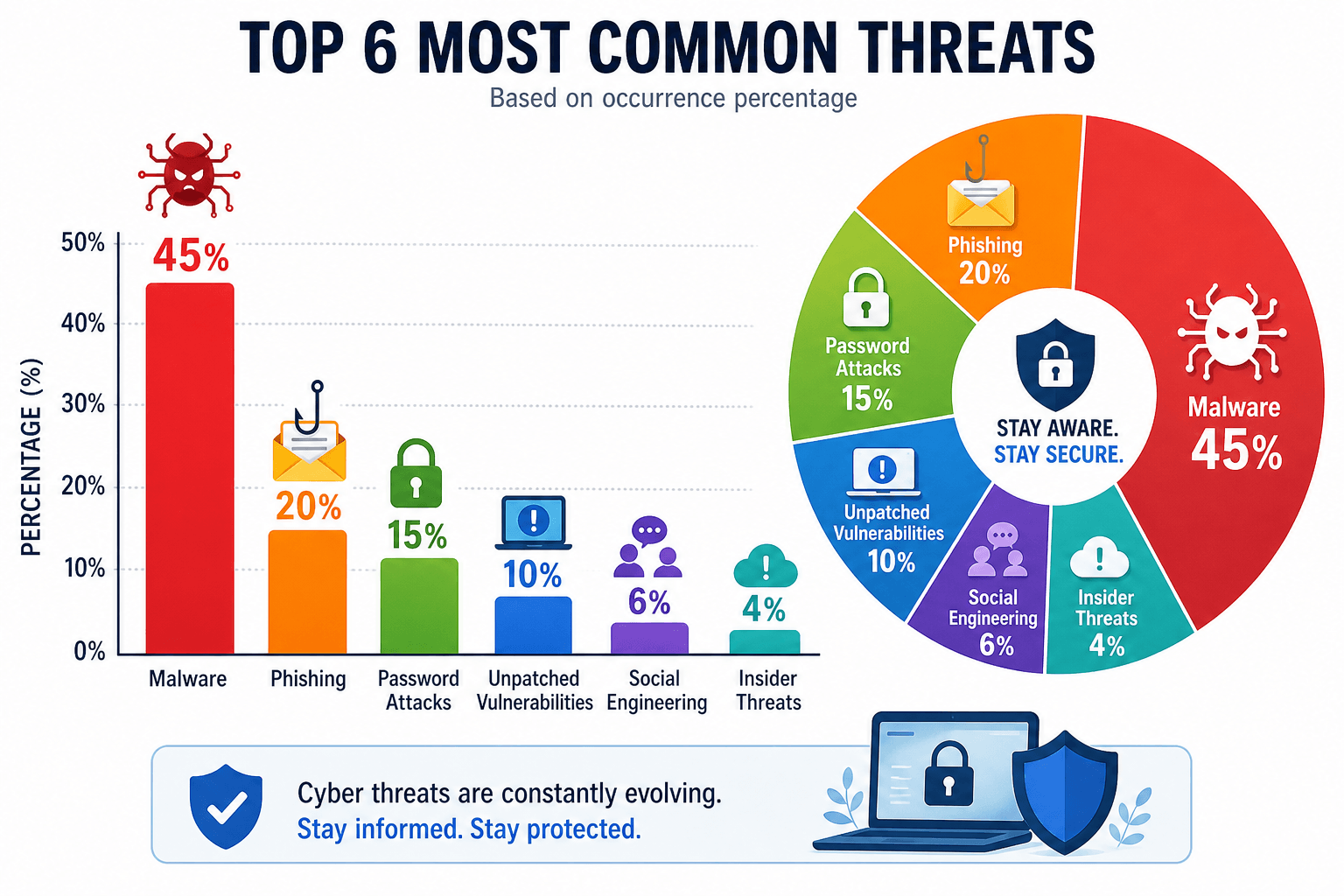
Understanding the threats is the first step to defending against them. Cybercriminals use a wide variety of techniques to breach systems and steal data.
5
How Cybercriminals Attack Systems
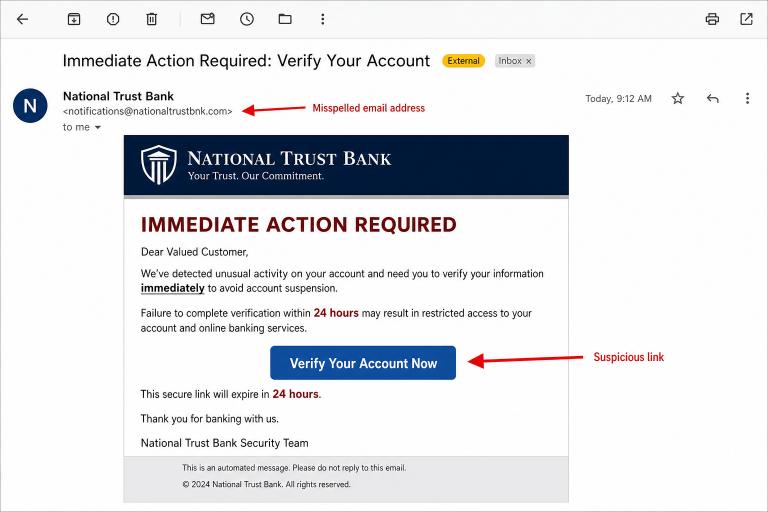
Fake Emails and Malicious Links
The most common attack vector. Criminals send emails appearing to come from trusted sources — your bank, employer, or popular services like Amazon or PayPal. These emails contain links to fake websites that steal credentials, or attachments that install malware when opened.
Infected Software Downloads
Attackers distribute malware disguised as legitimate software — free games, cracked applications, utilities, or browser extensions. Once installed, the malware operates silently in the background.
Weak Password Exploitation
Automated tools can test thousands of password combinations per second (brute-force attacks). Dictionary attacks use common words and phrases. Many people use easily guessable passwords like "123456" or "password," making these attacks highly effective.
Public Wi-Fi Attacks
Unsecured public Wi-Fi networks (in coffee shops, airports, hotels) are prime hunting grounds. Attackers can create fake hotspots with convincing names ("Airport_Free_WiFi") and intercept all traffic from connected devices.
Exploiting Outdated Software
Software companies regularly release security patches. Attackers actively scan the internet for systems running outdated software, knowing that patches have revealed exactly where the vulnerabilities are in systems that haven't updated yet.
Website Vulnerabilities
SQL injection attacks insert malicious code into website forms to manipulate databases — potentially extracting, modifying, or deleting data. Cross-site scripting (XSS) injects malicious scripts into web pages that execute in visitors' browsers, stealing cookies or redirecting to phishing sites.
Human Error and Manipulation
Remote Access Trojans (RATs) give attackers full remote control over a victim's computer. Often installed through social engineering, the attacker watches everything the victim does in real time without their knowledge.
6
Signs of a Cybersecurity Breach
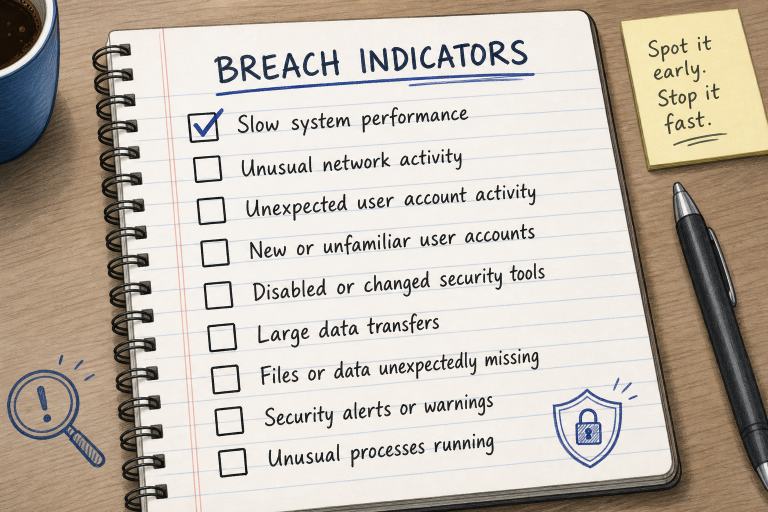
Catching a breach early can dramatically reduce damage. Here are the warning signs every user and business should know:
7
Effective Cybersecurity Solutions
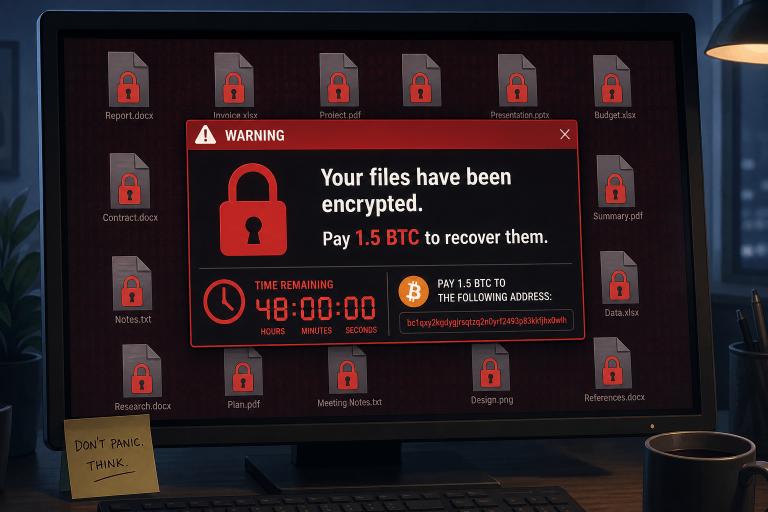
Antivirus and Anti-Malware Software
Antivirus software scans your system for known malicious code and monitors for suspicious behaviour. Windows users get Microsoft Defender for free — it's effective for basic protection. Businesses may prefer paid options like Norton, McAfee, or Bitdefender for advanced features including real-time cloud scanning and ransomware protection.
Firewalls
A firewall acts as a gatekeeper between your network and the internet, blocking unauthorised traffic. Every device comes with a built-in firewall — make sure it's enabled. Businesses should also deploy Web Application Firewalls (WAFs) to protect websites from SQL injection, XSS, and other web-based attacks.
Multi-Factor Authentication (MFA)
MFA requires users to verify their identity using two or more of the following:
- Something you know — a password or PIN
- Something you have — a phone, hardware token, or authenticator app
- Something you are — fingerprint, face recognition, or iris scan
MFA blocks more than 99% of automated account attacks. Enable it on every account that offers it — especially email, banking, and social media.
VPN (Virtual Private Network)
A VPN encrypts your internet connection and hides your IP address, making it extremely difficult for attackers to intercept your traffic. Always use a VPN when connecting to public Wi-Fi. Choose a paid, reputable VPN with a strict no-logs policy — free VPNs often sell your data.
Encryption
Encryption converts readable data into coded format that requires a key to decode. Use AES-256 encryption — the gold standard used by governments and militaries. For messages, use Signal, WhatsApp, or ProtonMail. For devices, use BitLocker (Windows) or FileVault (Mac). Even if attackers steal your encrypted data, they cannot read it without the key.
Regular Software Updates and Patch Management
Software updates include critical security patches that fix known vulnerabilities. Attackers specifically target unpatched systems because the vulnerabilities are publicly disclosed. Enable automatic updates for your OS, browsers, and applications. In business environments, use patch management software to deploy updates across all systems.
Secure Backups — The 3-2-1 Rule
Backups are your ultimate safety net against ransomware and data loss. Follow the 3-2-1 rule:
- Keep 3 copies of your data
- Store them on 2 different types of storage media
- Keep 1 copy offsite or in the cloud
Regularly test that your backups can actually be restored — a backup you can't restore is worthless.
Access Control and Zero-Trust Architecture
Apply the principle of least privilege — users should only access data and systems they absolutely need for their job. Zero-trust architecture takes this further: verify every user, every device, every time, regardless of whether they're inside or outside the corporate network. Trust no one by default.
Email Filtering Gateway
Scans incoming email for phishing attempts, malicious attachments, and spam before they reach employees' inboxes.
EDR — Endpoint Detection & Response
Advanced endpoint protection that continuously monitors devices for suspicious behaviour and responds automatically to threats.
SIEM
Security Information & Event Management — collects and analyses security events from across your entire infrastructure in real time.
Password Managers
Generate and store unique, complex passwords for every account. Top choices include LastPass, Bitwarden, and 1Password.
8
Best Practices for Personal Cybersecurity
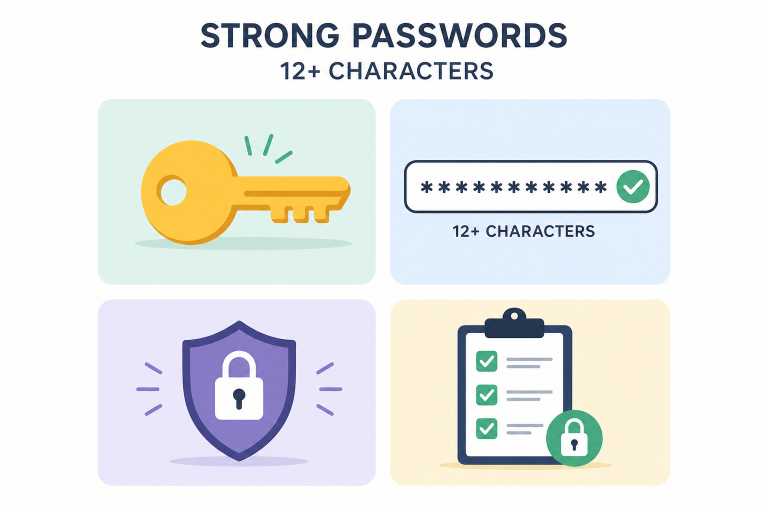
Creating Strong Passwords
A strong password should be at least 12 characters long and include a mix of uppercase letters, lowercase letters, numbers, and symbols. Avoid predictable patterns like "Password1!" Consider using a passphrase — a sequence of random words that's easy to remember but hard to guess. Example: "BlueCoffeeSharkJump7" is far stronger than most typical passwords.
Avoiding Suspicious Emails
Before clicking any link or opening any attachment: Did you expect this email? Check the sender's email address carefully — attackers often use addresses like "support@paypa1.com" (with a "1" instead of "l"). Hover over links before clicking to see the actual destination URL. Be especially sceptical of urgent messages claiming your account will be closed or you've won a prize.
Social Media Privacy
Oversharing on social media gives attackers ammunition for social engineering. Review your privacy settings and limit who can see your posts and contact information. Never post information that could answer security questions — your mother's maiden name, your first car, your childhood school.
Safe Online Shopping
Only shop on websites with HTTPS (the padlock icon in your browser). Use a credit card rather than a debit card — credit cards have much better fraud protection. Never save payment information on websites you don't use regularly.
Mobile Device Security
Lock your phone with a strong PIN or biometric authentication. Only install apps from official stores (App Store or Google Play). Regularly review app permissions — a flashlight app has no legitimate reason to access your contacts or location. Enable remote wipe capability so you can erase your phone if it's lost or stolen.
Secure Wi-Fi Practices
At home, use WPA2 or WPA3 encryption on your Wi-Fi. Change your router's default password immediately after setup — default credentials are publicly known. On public Wi-Fi, always use a VPN and avoid accessing sensitive accounts like banking.
9
Cybersecurity for Businesses
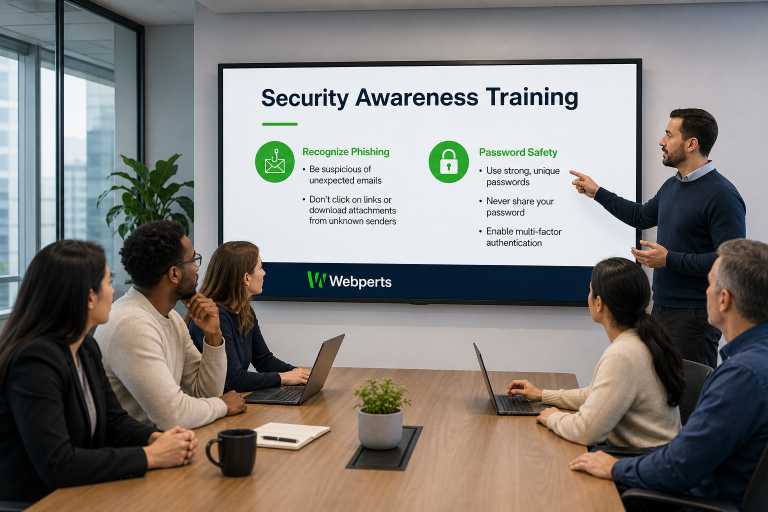
Businesses face a higher level of risk and complexity than individuals. A breach doesn't just affect the business — it affects every customer, partner, and employee whose data is stored in your systems.
Employee Security Training
Your employees are both your greatest vulnerability and your most important line of defence. Regular security awareness training teaches staff to recognise phishing emails, handle sensitive data properly, and follow secure password practices. Consider running simulated phishing exercises — sending fake phishing emails to test whether employees click. Those who do get immediate, targeted training.
Data Protection Policies
Written policies make security expectations clear and enforceable. You need policies covering: data classification (what data is sensitive), data handling (how it must be stored and transmitted), access control (who can access what), and acceptable use (what employees can and cannot do with company devices and networks).
Incident Response Planning
Having a plan before a breach occurs dramatically reduces response time and damage. Your incident response plan should define: who to call first (internal team, external incident response firm, legal counsel), how to isolate infected systems without disrupting the entire business, when to notify customers and regulators (GDPR requires notification within 72 hours), and how to restore operations from clean backups.
Role-Based Access Control (RBAC)
Not everyone in your organisation needs access to everything. An intern shouldn't have access to payroll data. A sales representative doesn't need access to source code. Implement RBAC to ensure employees have exactly the permissions they need — nothing more. Review and update permissions regularly, especially when roles change or employees leave.
Regulatory Compliance
Depending on your industry and the data you handle, you may be legally required to meet specific security standards. GDPR (EU data protection) — fines up to €20 million or 4% of global annual revenue. HIPAA (US healthcare) — civil and criminal penalties. PCI DSS (credit card processing) — mandatory for any business accepting card payments. Compliance is not just about avoiding fines — meeting these standards means implementing good security practices that protect your business.
Cyber Insurance and Managed Security Services
Cyber insurance helps cover the costs of a breach — legal fees, notification costs, and business interruption losses. For small and medium businesses that can't afford a dedicated in-house security team, Managed Security Service Providers (MSSPs) offer 24/7 monitoring, threat detection, and incident response — giving SMBs enterprise-grade security without the cost of building an internal security operations centre.
10
Importance in Different Industries
Banking & Finance
Handles money and financial data — the most targeted sector. Requires transaction monitoring and near 100% system availability. A minute of downtime can cost millions.
Healthcare
Patient data is highly sensitive and valuable. In 2023, healthcare faced 500+ ransomware attacks. HIPAA compliance is mandatory. Breaches here can be life-critical — ransomware has delayed surgeries.
Government
Protects national security data, citizen records, and critical infrastructure. Sophisticated nation-state attackers specifically target government systems.
E-Commerce
Holds payment card information and customer personal data. Must comply with PCI DSS. A single breach destroys customer trust built over years.
Education
Universities and schools hold sensitive student and staff data. Often under-resourced for security. Research institutions are targeted for intellectual property theft.
Industrial & Manufacturing
Industrial Control Systems (ICS) managing physical machinery are increasingly connected. The Colonial Pipeline attack showed how ransomware can disrupt fuel supplies to millions of people.
11
Emerging Trends in Cybersecurity
AI in Cybersecurity
AI can spot a malicious login attempt in milliseconds by recognising behavioural anomalies. But attackers also use AI to create more convincing phishing emails and automate vulnerability scanning.
Machine Learning & Behavioural Analytics
ML systems learn what "normal" looks like for users and networks, then flag deviations. This approach catches zero-day attacks that signature-based tools miss.
Cloud-Native Security
Security designed specifically for cloud environments — automated compliance checking, container security, and cloud workload protection — rather than adapted from on-premises tools.
Rise of Ransomware
Ransomware gangs now use double and triple extortion tactics — they encrypt your data AND threaten to publish it unless you pay. Some also attack your customers or partners to add pressure.
Cybersecurity Automation
Automating patch management, log analysis, and incident response reduces response times from days to minutes. Human analysts focus on complex decisions while automation handles routine tasks.
Zero-Trust Architecture
Moving beyond perimeter-based security to continuously verify every user and device, regardless of location. Adaptive frameworks adjust access in real time based on risk signals.
Quantum Computing Risks
Quantum computers will eventually break today's encryption algorithms. Researchers are urgently developing quantum-resistant encryption standards. Every connected device will eventually need updating.
Threat Intelligence
Organisations share actionable intelligence about active attackers — their tools, tactics, and targets. This collective defence helps all participants protect against threats already seen elsewhere.
12
Benefits of Strong Cybersecurity
Data Confidentiality
Only authorised users can access sensitive information. Your personal data, business secrets, and customer records stay private.
Data Integrity
Cryptographic hashes and checksums verify that data hasn't been tampered with. You can trust that information you receive hasn't been altered.
System Availability
DDoS protection, redundant systems, and tested backups ensure your services stay online even under attack.
Customer Trust
Demonstrating strong security practices becomes a competitive advantage. Customers choose to do business with companies they trust with their data.
Regulatory Compliance
Meeting GDPR, HIPAA, PCI DSS, and other regulatory requirements avoids fines that can reach tens of millions of dollars.
Business Resilience
Organisations with mature security practices recover from incidents faster and suffer less damage, maintaining operational continuity even after attacks.
Identity Protection
MFA combined with credential monitoring prevents attackers from using stolen passwords to access your accounts.
Reputation Management
Avoiding breaches protects brand reputation. Recovery from a major breach can take years — proactive security is far less expensive than crisis management.
13
Cybersecurity Challenges
14
The Future of Cybersecurity
AI-Driven Threats
AI will enable attackers to automate vulnerability scanning at scale, generate convincing deepfake voice calls for social engineering, and create personalised phishing emails that bypass traditional filters.
Autonomous Security Systems
Security systems that detect and respond to threats without human intervention — containing breaches in milliseconds rather than hours or days.
Cyber Warfare
Nation-states are building sophisticated offensive cyber capabilities. Conflicts increasingly have a digital front alongside physical operations, targeting infrastructure and critical systems.
Quantum-Resistant Encryption
A massive global undertaking — every device, website, and application will need to migrate to quantum-resistant algorithms before quantum computers break current encryption.
Smart City Security
As cities connect traffic systems, power grids, water treatment, and emergency services to the internet, securing this infrastructure becomes critical to public safety.
Cybersecurity Education
Security awareness is being built into school curricula worldwide — teaching children digital safety from an early age, creating a more security-aware generation.
15
Historical Background & Famous Attacks
The term "cybersecurity" emerged in the 1990s, but the concept dates back to the 1970s. The first antivirus software was developed in 1987. Understanding this history helps us appreciate how rapidly the threat landscape has evolved.
| Year | Attack | Impact |
|---|---|---|
| 1971 | Creeper Virus | First known self-replicating program — spread across ARPANET but caused no damage. More of an experiment than an attack. |
| 1988 | Morris Worm | Infected approximately 10% of all internet-connected computers at the time. Caused millions of dollars in damage — the first major cyberattack. |
| 2000 | ILOVEYOU Virus | Spread via email, infected 50 million computers worldwide in just days. Caused an estimated $10 billion in damage. |
| 2010 | Stuxnet | First known cyber weapon — damaged Iranian nuclear centrifuges using multiple zero-day vulnerabilities. Widely attributed to US and Israeli intelligence. |
| 2017 | WannaCry Ransomware | Infected 200,000 systems across 150 countries in hours. Disrupted the UK's NHS healthcare system. Demanded Bitcoin ransoms. |
| 2017 | NotPetya | Disguised as ransomware but designed purely for destruction. Caused over $10 billion in damages — the most destructive cyberattack in history. |
| 2020 | SolarWinds | Supply chain attack via a compromised software update. Breached multiple US government agencies and thousands of corporations for months before detection. |
16
Key Cybersecurity Statistics
| Metric | 2021 | 2023 | 2025 (Projected) |
|---|---|---|---|
| Global cybercrime losses | $6 trillion | $8 trillion | $10.5 trillion |
| Average ransomware demand | $150,000 | $1.5 million | Rising |
| Average data breach cost | $4.24M | $4.45M | Rising |
| Healthcare breach cost | $9.23M | $10.93M | Rising |
| Businesses hit by ransomware | 37% | 72% | Expanding |
| % that paid ransom | 32% | 26% | Declining |
17
Famous Cybersecurity Breaches — Case Studies
Equifax Data Breach
Attackers exploited an unpatched vulnerability in a web application framework to gain access to internal systems. The breach exposed the personal data of 147 million people — including Social Security numbers, birth dates, addresses, and credit card data. The attack went undetected for 78 days.
Yahoo! Data Breaches
Yahoo suffered two separate massive data breaches affecting a staggering 3 billion accounts — essentially every Yahoo user account that existed. The breaches weren't disclosed to the public until 2016 — two years after the second breach. The delay severely damaged Yahoo's credibility and reduced the sale price of Yahoo's core business to Verizon by $350 million.
Colonial Pipeline Ransomware Attack
Attackers gained access through a single compromised password for a legacy VPN account not protected with MFA. Colonial paid $4.4 million in Bitcoin ransom to regain control. The pipeline supplies 45% of the East Coast's fuel — the shutdown caused fuel shortages and panic buying across multiple US states. The company had no practiced incident response plan.
SolarWinds Supply Chain Attack
Attackers — widely attributed to Russian intelligence — compromised SolarWinds' software build process to insert malware into a legitimate software update. Approximately 18,000 organisations — including multiple US government agencies, Microsoft, Intel, and Cisco — downloaded and installed the malicious update. Attackers had access to victims' networks for up to 14 months before detection.
18
Cybersecurity Tools Comparison
| Tool Type | Free Options | Paid Options | Best For |
|---|---|---|---|
| Antivirus Software | Microsoft Defender | Norton, McAfee, Bitdefender | Home users and small businesses |
| Endpoint Protection | Limited free tiers | CrowdStrike, Cisco Secure Endpoint | Businesses with multiple devices |
| Network Firewall | Built-in OS firewall | Palo Alto Networks, Fortinet | Advanced users and enterprises |
| Password Manager | Bitwarden (limited) | LastPass, 1Password | All users — highly recommended |
| VPN | ProtonVPN (limited) | ExpressVPN, NordVPN, Mullvad | Remote workers, public Wi-Fi users |
| Encrypted Email | ProtonMail (limited) | ProtonMail Plus, Tutanota | Privacy-conscious users, businesses |
19
Common Myths About Cybersecurity
FALSE. 43% of cyberattacks specifically target small businesses — precisely because they often have valuable data but weaker security than large enterprises. Attackers know SMBs are less likely to have dedicated security teams or advanced monitoring.
FALSE. Macs are absolutely vulnerable to malware. In 2021, the Silver Sparrow malware infected more than 30,000 Mac computers across 153 countries — including the new M1-based Macs. macOS has better built-in security than older Windows versions, but it is not immune.
FALSE. Even the strongest password can be stolen — through phishing, keyloggers, or data breaches on other sites. Strong passwords must be combined with multi-factor authentication (MFA) to provide real protection.
FALSE. Cloud providers operate under a shared responsibility model. The provider secures the infrastructure — physical data centres, networking, hypervisors. You are responsible for securing your data, your access controls, and your applications running on that infrastructure.
20
Cybersecurity Checklists
21
Certifications & Regulations
CompTIA Security+
Entry-level certification — ideal for starting a cybersecurity career. Covers foundational security concepts, threats, and defensive practices.
CISSP
Advanced certification for experienced security professionals and managers. Covers security architecture, risk management, and governance.
CEH — Certified Ethical Hacker
Teaches how attackers think and operate. Ethical hackers use this knowledge to find vulnerabilities before criminals do. Earns $100K–$130K/year in the US.
CISM
Certified Information Security Manager — focuses on security management and governance. Ideal for security leadership and strategy roles.
| Regulation | Applies To | Key Requirements | Penalties |
|---|---|---|---|
| GDPR | EU citizens' data | Data protection, consent, 72-hour breach notification | Up to €20M or 4% of global revenue |
| HIPAA | US healthcare organisations | Protect patient health information, access controls, audit logs | Civil and criminal penalties |
| PCI DSS | Any org accepting credit cards | Encrypt cardholder data, network monitoring, vulnerability management | Fines and loss of card processing |
| ISO 27001 | Organisations globally | Information security management system (ISMS), risk assessment | Loss of certification |
| NIST CSF | US organisations (voluntary) | Identify, Protect, Detect, Respond, Recover framework | Voluntary — no direct penalties |
| CCPA | California residents' data | Right to know, delete, and opt out of data sale | Up to $7,500 per intentional violation |
22
Frequently Asked Questions
Phishing is currently the most significant cybersecurity threat. Unlike technical attacks that target software vulnerabilities, phishing targets humans directly — exploiting psychology rather than code. It's behind more than 90% of successful cyberattacks. A convincing email can bypass millions of dollars of security technology by simply tricking an employee into revealing their password or installing malware.
No system can prevent 100% of attacks. The goal of cybersecurity is to make attacks as difficult and costly as possible, while minimising damage when breaches do occur. Even the most security-conscious organisations get breached — the differentiator is how quickly they detect it and how effectively they respond. This is why detection and response capabilities are just as important as prevention.
Modern security guidance says: only change passwords when you suspect they've been compromised — for example, if a service you use announces a data breach. Research has shown that frequent mandatory password changes lead users to create weaker passwords. Instead, use long, unique passwords for every account stored in a password manager, and protect accounts with MFA.
No. Antivirus is an important layer, but it's just one layer. Modern threats require a multi-layered approach: strong unique passwords in a password manager, multi-factor authentication on important accounts, regular software updates to patch vulnerabilities, secure backups for ransomware recovery, and security awareness to recognise social engineering. Think of antivirus as one tool in a full toolkit — not the entire toolkit.
Encryption converts readable data into a coded format (ciphertext) that can only be decoded with the correct key. Even if attackers steal your encrypted data, they cannot read it without the decryption key. The current gold standard is AES-256 encryption — so secure that with all of today's computing power it would take millions of years to crack by brute force. Enable full-disk encryption on all your devices.
Cyber hygiene refers to the routine practices individuals and organisations follow to maintain digital health and security — just as physical hygiene routines prevent illness. Good cyber hygiene includes: keeping software updated, using strong unique passwords, enabling MFA, backing up data regularly, being sceptical of unsolicited messages, and reviewing account permissions periodically. Like physical hygiene, it's most effective when it becomes a consistent habit.
23
Cybersecurity Glossary
| Term | Definition |
|---|---|
| Malware | Any software intentionally designed to cause disruption, damage, or gain unauthorised access to computer systems. |
| Encryption | The process of converting readable data into an encoded format that can only be accessed with the correct decryption key. |
| Firewall | A security system that monitors and controls incoming and outgoing network traffic based on predetermined security rules. |
| VPN | Virtual Private Network — a service that encrypts your internet connection and hides your IP address, protecting your privacy online. |
| Authentication | The process of verifying that a user, device, or system is who or what it claims to be. |
| Phishing | A fraudulent attempt to obtain sensitive information by disguising communications as coming from a trustworthy source. |
| Botnet | A network of infected computers controlled remotely by an attacker, often used for DDoS attacks or sending spam. |
| Exploit | Code or a technique that takes advantage of a vulnerability in software or hardware to cause unintended behaviour. |
| Vulnerability | A weakness in software, hardware, or processes that can be exploited by an attacker. |
| Threat Actor | An individual, group, or organisation responsible for a cyberattack or security incident. |
| Trojan | Malware that disguises itself as legitimate software to trick users into installing it. |
| Spyware | Malware that secretly monitors user activity — recording keystrokes, capturing screens, or tracking browsing — without consent. |
| Patch | A software update designed to fix a specific security vulnerability or software bug. |
| Zero-Day | A vulnerability unknown to the software vendor and for which no patch yet exists — making it extremely valuable to attackers. |
| Endpoint Security | Security measures applied to individual devices — laptops, phones, servers — that connect to a network. |
24
How Webperts Can Help
Webperts is an IT outsourcing company based in Dubai, offering comprehensive cybersecurity services designed to protect businesses of all sizes. We combine automated scanning tools with manual expert review — giving you the thoroughness that automated tools miss and the speed that manual-only approaches can't achieve.
Vulnerability Scanning
Comprehensive scanning of your infrastructure, web applications, and network to identify vulnerabilities before attackers do.
Malware Removal & Prevention
Detection and removal of existing malware, plus implementation of measures to prevent future infections.
Firewall Configuration
Secure configuration and ongoing management of network and application firewalls tailored to your business requirements.
Security Monitoring
Ongoing monitoring of your systems and networks for suspicious activity, with rapid incident response.
Security Audits & Reports
Regular security audits with clear, actionable reports that help you understand your security posture and prioritise improvements.
Backup & Recovery Testing
Verification of your backup systems and regular recovery testing to ensure your data can actually be restored when needed.
25
Conclusion
Cybersecurity is not a product you buy once and forget. It's an ongoing practice — a continuous process of identifying risks, implementing controls, monitoring for threats, and improving your defences as the threat landscape evolves.
The foundation is straightforward: strong unique passwords managed in a password manager, multi-factor authentication on every important account, regular software updates to patch vulnerabilities, secure backups following the 3-2-1 rule, and a healthy scepticism toward unexpected emails, messages, and calls. These five habits alone will protect you from the vast majority of attacks.
For businesses, the stakes are higher and the approach must be more comprehensive — covering employee training, incident response planning, regulatory compliance, and potentially managed security services. But the underlying principle remains the same: defence in depth, continuous improvement, and a culture where everyone takes security seriously.
Protect Your Business with a Free Security Audit
The Webperts team works with businesses in Dubai and the UAE to implement intelligent digital security that drives measurable protection. Whether you're evaluating your current posture, recovering from an incident, or building security from the ground up — we bring the technical expertise and business understanding to make it work for your specific context.
Get Your Free Cybersecurity Audit →Explore IT Outsourcing Services